JTriStateCheckBox
1 Setting the state of the tristate checkbox
2 Getting the state of the tristate checkbox
3 Handling the user selection
3.1 Default behavior
3.2 If the partial state is accepted
4 Listening to the user selection
4.1 Using the ActionListener
4.2 Using the TriStateChangeListener
5 Example
2 Getting the state of the tristate checkbox
3 Handling the user selection
3.1 Default behavior
3.2 If the partial state is accepted
4 Listening to the user selection
4.1 Using the ActionListener
4.2 Using the TriStateChangeListener
5 Example
The JTriStateCheckBox class is a checkbox which manages three states.
Contrary to the
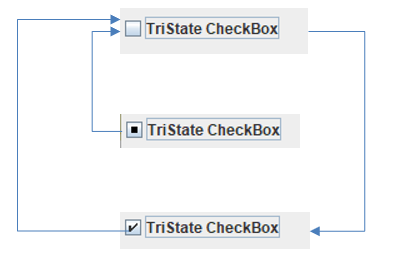
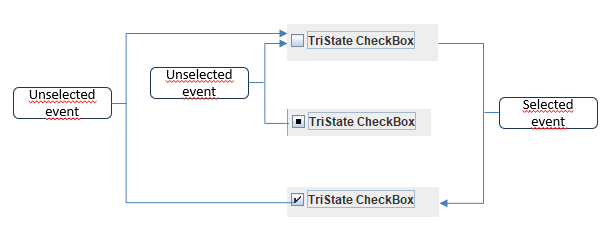
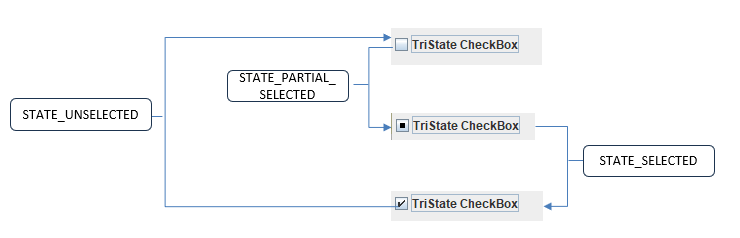
By default a selection event or unselection event will be sent depending on the diagram transition:
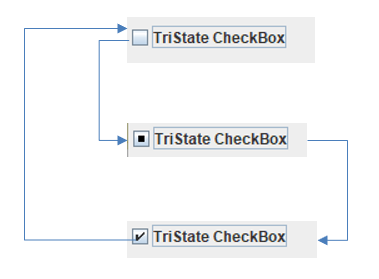
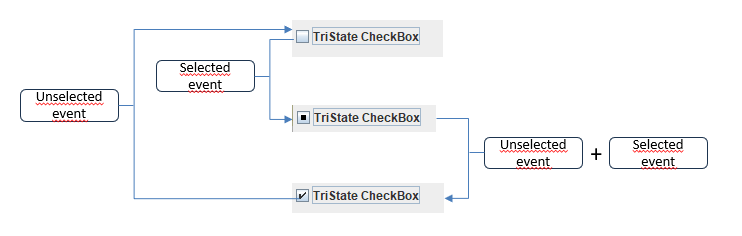
If the partial state is accepted, the diagram transitrion is the following:
Contrary to the
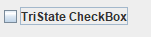
JCheckBox component, the JTriStateCheckBox has three states:- The unselected state:
- The partially selected state:

- The selected state:

Setting the state of the tristate checkbox
The JTriStateCheckBox.setState(short state) allows to set the checkbox state externally:- The TriStateChangeEvent.STATE_UNSELECTED value sets the unselected state
- The TriStateChangeEvent.STATE_PARTIAL_SELECTED value sets the partially selected state
- The TriStateChangeEvent.STATE_SELECTED value sets the selected state
- The
falsevalue will set the unselected state - The
falsevalue will set the selected state
Getting the state of the tristate checkbox
The JTriStateCheckBox.getState() method returns the checkbox state:- The TriStateChangeEvent.STATE_UNSELECTED value represents the unselected state
- The TriStateChangeEvent.STATE_PARTIAL_SELECTED value represents the partially selected state
- The TriStateChangeEvent.STATE_SELECTED value represents the selected state
Handling the user selection
The handling of the user selection depends on the value of the JTriStateCheckBox.setAcceptPartialState(boolean accept) method:- By default it is not possible to go to the partial state through user clicks
- It the argument is
truethe checkbox the partial state through user clicks
Default behavior
By default it is not possible to go to the partial state though user selections. The diagram is:
If the partial state is accepted
It you call the JTriStateCheckBox.setAcceptPartialState(boolean accept) method withtrue as argument, you will go to the partial state though user selections. The diagram is:
Listening to the user selection
It is possible to listen to the user selection using both the AbstractButton.addActionListener(ActionListener listener) method and the AbstractButton.addActionListener(ActionListener listener) method and the JTriStateCheckBox.addStateChangeListener(TriStateChangeListener listener) method.Using the ActionListener
The AbstractButton.addActionListener(ActionListener listener) method listens to the selection events on the check box. The results are different depending on how user selection is handled:By default a selection event or unselection event will be sent depending on the diagram transition:
If the partial state is accepted, the diagram transitrion is the following:
Using the TriStateChangeListener
The TriStateChangeListener will be fired for state changes. For example, if the partial state is accepted:
Example
   JFrame f = new JFrame("test");
   f.setSize(200, 300);
   JTriStateCheckBox cb = new JTriStateCheckBox("Checkbox");

   cb.addStateChangeListener(new TriStateChangeListener() {
     public void stateChanged(TriStateChangeEvent e) {
       System.out.println("Change : " + e.getStateChange());
     }
   });

   f.getContentPane().setLayout(new FlowLayout());
   f.getContentPane().add(cs);
   f.addWindowListener(new WindowAdapter() {
     @Override
     public void windowClosing(WindowEvent e) {
       System.exit(0);
     }
   });
   f.pack();
   f.setVisible(true);
×
![]()
Categories: Packages | Swing
